Smartphones have become the single most important personal device most people own. The iPhone 17 Pro Max, Samsung Galaxy S25 Ultra, Google Pixel 10 Pro, and OnePlus 13 are not just phones — they are productivity tools, financial management systems, health trackers, and entertainment hubs, all packed into a glass-and-metal frame that fits in a pocket. In 2026, the average consumer spends between $700 and $1,400 on a flagship smartphone, which makes understanding what can go wrong — and what to do about it — genuinely valuable knowledge.
The reality is that even the most carefully handled phones eventually need repair. Screens crack. Batteries degrade. Charging ports wear out. Cameras lose focus clarity. Water finds its way in. These are not signs of a poorly made product — they are the natural consequences of daily use of a complex electronic device. Knowing what to expect, what the symptoms look like, what the repair process involves, and roughly what it will cost puts you in a much stronger position when something does go wrong.
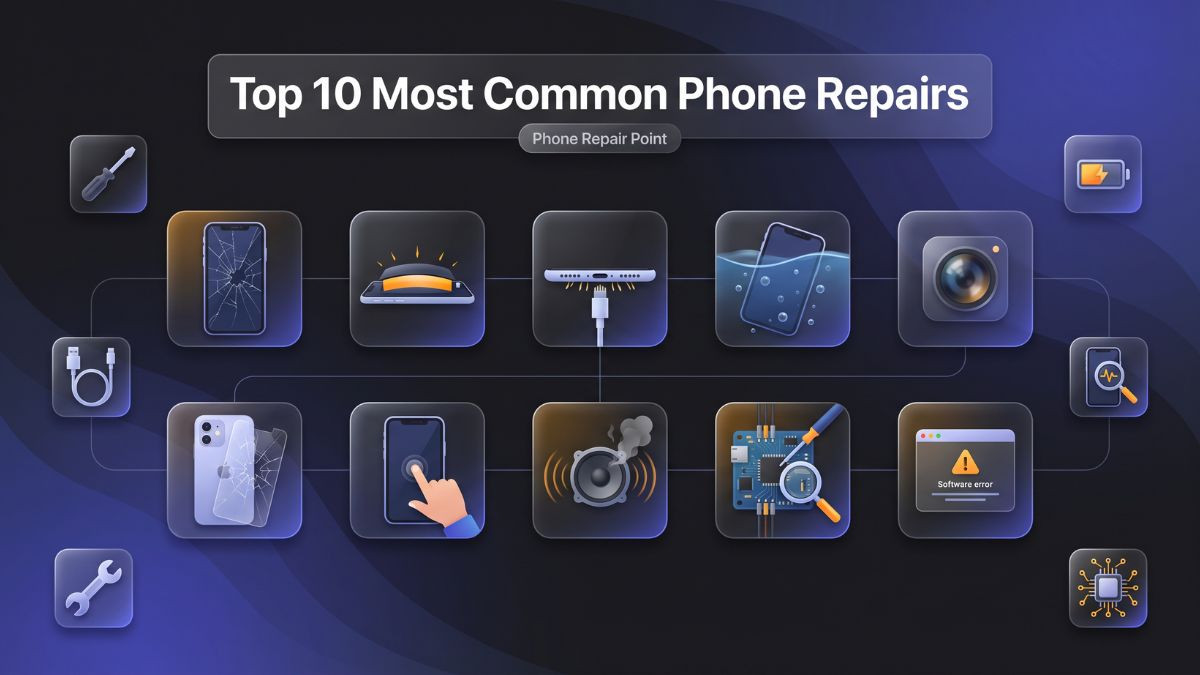
This article covers the top 10 most common phone repairs in 2026 in genuine depth. Each repair type is examined from the perspective of causes, symptoms, troubleshooting steps, professional repair processes, and realistic cost expectations. Whether you are dealing with a shattered iPhone screen, a Galaxy S25 battery that barely lasts until noon, or a Pixel 10 that stopped charging, this guide gives you the information to make smart, confident decisions about your device.
Both do-it-yourself approaches and professional repair services are addressed throughout, with honest guidance on which repairs are realistic for home completion and which ones genuinely require the tools, training, and expertise of a professional mobile repair shop. The goal throughout is practical education — not just a list of services, but a real understanding of the problems and their solutions.
Repair #1 — Cracked Screen Repair
Cracked screen repair is the single most common smartphone repair service performed in repair shops worldwide, and 2026 is no different. Despite meaningful advances in display glass technology — including Corning Gorilla Glass Ceramic 2 on the iPhone 17 series and Corning Gorilla Glass Armor 2 on Samsung Galaxy S25 devices — phone screens continue to crack at high rates. The reason is straightforward: the same large, thin glass panels that deliver stunning visual experiences are inherently vulnerable to the concentrated impact force of a phone striking a hard surface from waist or chest height.
Causes
The most obvious cause is a drop onto a hard floor, sidewalk, or countertop. However, screen damage does not always require a dramatic fall. Sitting on a phone, placing heavy objects on top of it in a bag, or even flexing a large-screen device during use can generate stress fractures. Thermal cycling — moving repeatedly between cold outdoor temperatures and warm indoor environments — also weakens the glass over time, making it more susceptible to cracking from minor impacts.
Symptoms
Cracked screen symptoms range from cosmetic to severely functional. A hairline crack in one corner may affect nothing initially, but cracks spread with continued use and flexing. Once the digitizer layer beneath the glass is affected, touch response begins failing in specific areas. Internal OLED damage manifests as dark patches, spreading black areas, color distortion, or a completely black screen that still emits light through the edges. Any of these symptoms beyond a minor cosmetic crack warrants prompt attention.
Troubleshooting Steps
Before heading to a repair shop, assess the damage clearly. If the phone still functions and touch response is intact, the damage is likely limited to the outer glass. If touch fails in specific zones, the digitizer is compromised. If the display is discolored or showing spreading darkness, the OLED panel itself is damaged. These assessments help the repair technician understand the scope of the repair immediately.
Professional Repair Process
Broken phone display replacement on modern smartphones involves carefully heating the device to soften the adhesive securing the display assembly, using specialized prying tools to separate the screen without damaging the frame, disconnecting the display ribbon cables, installing the new display assembly, and resealing the device with fresh adhesive to restore water resistance. On curved OLED devices like the Galaxy S25 Ultra, this process requires additional precision because the screen must align perfectly with the curved edges of the aluminum frame.
DIY Feasibility
Screen replacement is technically possible for experienced DIY repairers on older or flat-panel models using quality repair kits. However, on current flagship models with LTPO OLED, curved panels, or Face ID sensor arrays, the risk of causing additional damage during disassembly is significant. Professional repair is strongly recommended for any device valued above $500.
Repair #2 — Battery Replacement
Smartphone battery replacement service is the second most frequently requested repair across all device types, and it is also the repair that delivers one of the most dramatic improvements in user experience when performed correctly. A fresh, high-quality battery can make a two-year-old phone feel genuinely new again in terms of daily performance and reliability.
Causes of Battery Degradation
Lithium-ion batteries, including the newer silicon-carbon anode batteries used in some 2025 and 2026 flagships, degrade through a chemical process called capacity fade. Every charge cycle reduces the battery's ability to hold its maximum charge by a small amount. Certain behaviors accelerate this degradation significantly — habitually charging to 100 percent and draining to near zero, using high-wattage fast chargers in hot environments, and leaving the device in direct sunlight or a hot car all shorten battery lifespan considerably.
Symptoms of a Failing Battery
The most obvious symptom is a phone that no longer gets through a full day on a single charge when it previously did so comfortably. Unexpected shutdowns at seemingly high battery percentages — powering off at 25 or 30 percent — indicate that the battery's actual capacity no longer matches what the operating system's fuel gauge is reporting. Excessive warmth during charging, slower-than-normal charge times, and visible swelling at the back panel are more severe symptoms. A swollen battery is a safety concern that requires immediate professional attention.
On iPhones, iOS provides a battery health percentage in Settings under Battery. When this figure drops below 80 percent, Apple recommends a replacement. The iPhone 17 Pro Max ships with a 4,685 mAh battery; when degraded to 80 percent capacity, it effectively operates as a 3,748 mAh battery — a meaningful reduction. Similarly, Samsung's Galaxy S25 Ultra features a 5,000 mAh cell, and Samsung's Battery Care diagnostic tool shows degradation metrics directly in the device settings.
Professional Repair Process
Battery replacement on modern sealed smartphones requires opening the device by heating and carefully removing the back glass panel or front display assembly, depending on the phone's construction. The battery is typically secured with strong adhesive pull-tabs. A trained technician removes these adhesives carefully without bending or puncturing the cell, disconnects the battery connector from the logic board, and installs a new cell that matches the original capacity and connector specifications. The device is then reassembled and tested to confirm charging behavior and capacity reporting.
Cost and Turnaround
Most battery replacements for current flagship devices are completed in 30 to 60 minutes and cost between $75 and $130 depending on the model. This makes battery replacement one of the highest-value repairs available — spending $100 to restore a $1,000 phone to full performance is a straightforward financial decision.
Repair #3 — Charging Port Repair
Phone charging port repair is the third most common smartphone repair, and it is also one of the most frequently misdiagnosed. Many users assume a charging failure means the battery is dead, when in reality the port itself is the problem. A proper diagnosis before any parts replacement is always the correct first step.
Causes
USB-C ports — now universal across iPhone 17, Galaxy S25, Pixel 10, and all other major 2026 smartphones — sustain mechanical wear from daily cable connections. The internal contact pins weaken and can become bent or broken over time. Debris accumulation is the other major cause: pocket lint and dust compress at the base of the port over weeks and months, creating a physical barrier that prevents the cable from fully seating and completing the charging circuit. In some cases, the port housing cracks due to cable stress, particularly when cables are tugged sideways rather than pulled straight out.
Symptoms
Slow charging, intermittent charging that stops and starts, a cable that fits loosely or requires specific positioning to charge, or no charging response at all are the primary symptoms. If wireless charging still works normally on a phone that is not charging via cable, the port is almost certainly the issue rather than the battery or charging IC chip.
Troubleshooting Steps Before Professional Repair
A slow charging phone fix that costs nothing is a thorough port cleaning. Using a wooden or plastic toothpick — never a metal object that could damage the pins — carefully remove compacted debris from the port. A short burst of compressed air can also dislodge loose debris. After cleaning, try a different certified USB-C cable and a different wall adapter. If charging is restored, debris was the culprit. If the problem persists after cleaning and cable changes, the port itself needs professional evaluation.
Professional Repair Process
If the port is on a flex cable assembly — which is the case for many Android devices including several Galaxy S25 models — replacement involves disconnecting the old assembly and installing a new one, a relatively straightforward repair completed in 30 to 45 minutes. If the USB-C port is soldered directly to the main logic board — as is the case with some iPhone models — the repair requires microsoldering: removing the old port under a microscope using hot air, cleaning the solder pads, and soldering a new port with precision. This is firmly a professional-only repair.
Repair #4 — Water Damage Repair
Water damage phone repair solutions are among the most technically demanding services offered by professional repair shops, and the outcome depends heavily on how quickly the device receives professional treatment. Many people underestimate internal liquid damage because the phone appears to work immediately after the incident — only to develop worsening issues days or weeks later as corrosion advances.
How Water Damage Actually Works
When liquid enters a smartphone, it creates two primary categories of damage. Immediate electrical short circuits occur when water bridges connections on the logic board that should remain isolated, causing components to fail on the spot. Progressive corrosion damage develops as the liquid evaporates and leaves behind mineral deposits — or in the case of sugary drinks, organic residue — that corrode metal contacts, solder joints, and IC chips over time. This is why a phone may appear unaffected immediately after water exposure but fail completely within a few days.
IP68 ratings on devices like the iPhone 17 Pro Max and Galaxy S25 Ultra provide genuine but conditional protection. These ratings are established in clean, still water at controlled temperatures. Chlorinated pool water, saltwater, coffee, soda, and juice all cause significantly more damage than pure water, and aging silicone seals on older devices reduce water resistance meaningfully from original specifications.
Immediate Response Steps
Power the device off immediately. Do not attempt to charge it. Do not press buttons repeatedly to test if it works, as this can push water further into the device. Remove the SIM tray if accessible. Bring the device to a professional repair shop as soon as possible — within hours, not days. The rice bowl method does not work effectively and wastes critical early treatment time.
Professional Treatment Process
Mobile data recovery after damage and full device recovery begin with disassembly, battery disconnection, and visual inspection under magnification for corrosion indicators. The logic board and affected components are then processed through ultrasonic cleaning — submerged in an electronics-safe solution and subjected to high-frequency sound waves that dislodge corrosion and mineral deposits from microscopic component gaps. After cleaning, the board is inspected under microscope magnification, dried thoroughly, and tested. Components with irreversible damage undergo microsoldering replacement. Full recovery is not guaranteed in every case, but professional treatment dramatically improves outcomes compared to any home approach.
Repair #5 — Camera Repair and Blurry Focus Fix
Mobile camera repair for blurry focus issues has become increasingly common as smartphone cameras have grown into complex multi-lens systems. The rear camera systems on current flagship devices — including the five-lens arrangement on the iPhone 17 Pro Max and the 200MP quad-camera array on the Galaxy S25 Ultra — are sophisticated optical instruments, and they can develop issues that significantly degrade photo and video quality.
Causes of Camera Issues
The most common cause of a blurry camera is a cracked or scratched outer lens. On current flagship devices, the camera lenses are covered by sapphire crystal glass that is extremely hard but not impervious to damage from sharp impacts or abrasive surfaces. A fine scratch on the lens causes light diffraction that makes images appear soft or hazy. A more significant crack creates obvious visual artifacts across photos.
Optical image stabilization failures are another common cause of blurry images, particularly in video. The OIS mechanism inside the camera module physically compensates for hand movement using gyroscopic sensors and magnetic actuators. When this system fails, handheld photos and videos appear shaky or unfocused despite appearing stable to the naked eye. Autofocus failures — where the camera cannot lock focus regardless of the subject distance — typically indicate a failed focus actuator within the module itself.
Symptoms
Blurry photos that persist across all lighting conditions, a camera that audibly rattles when the phone is moved, horizontal or vertical banding across photos, a completely black camera feed despite the app functioning normally, and a camera that takes several seconds to achieve focus where it previously locked instantly are all meaningful symptoms.
Professional Repair Process
Camera lens replacement involves carefully removing the cracked sapphire lens cover and installing a new one matched to the original specifications. This is a relatively minor repair when limited to the lens cover. Full camera module replacement — necessary when the OIS mechanism, autofocus actuator, or image sensor itself has failed — involves disconnecting and removing the entire module from the phone's rear chassis and installing a replacement unit. On phones with multiple camera modules like the iPhone 17 Pro Max, technicians must ensure proper software calibration between modules after a replacement to ensure Portrait mode, optical zoom transitions, and computational photography features function correctly.
Repair #6 — Back Glass Replacement
Phone back glass replacement service has grown substantially as a repair category since manufacturers shifted from aluminum and polycarbonate backs to glass rear panels. The aesthetic appeal and premium feel of glass backs come with a real vulnerability: they crack just as readily as front screens, and in some cases more easily because backs receive less protective case coverage.
Why Back Glass Breaks
The rear glass panel on devices like the iPhone 17 Pro Max, Galaxy S25 Ultra, and Pixel 10 Pro is bonded to the frame with strong adhesive and is relatively thin — typically between 0.5mm and 0.8mm. A drop landing directly on the rear of the phone transmits concentrated impact force to this glass, causing it to crack or shatter. Because most users apply cases only to the front of their device — or use cases that leave the rear partially exposed — the back glass is frequently unprotected.
Why It Matters Beyond Aesthetics
A cracked back panel is not merely a cosmetic problem. The rear glass provides structural integrity to the device, contributes to its water resistance by sealing the internal components, and on wireless charging-enabled devices, maintains consistent proximity between the internal charging coil and the MagSafe or Qi2 charging pad. A cracked rear glass panel can reduce wireless charging efficiency and may allow moisture to enter the device, increasing the risk of water damage in subsequent exposure incidents.
Professional Repair Process
Back glass replacement on most current sealed smartphones requires careful heat application to soften the factory adhesive, precise prying tools to lift the cracked glass without damaging the internal components beneath it, thorough cleaning of old adhesive residue from the frame, and precise placement of the new glass panel with fresh adhesive. The device must then be sealed under controlled pressure until the adhesive cures. This process requires experience and patience — rushing any step risks damaging the camera module housing, wireless charging coil, or the internal components beneath the cracked glass.
Repair #7 — Touchscreen Not Responding
A touchscreen not working on a mobile device is a repair scenario that can have multiple causes, ranging from simple software glitches to genuine hardware damage. Accurately diagnosing whether the problem is hardware or software determines the correct repair path and prevents unnecessary part replacement.
Common Causes
Physical damage to the digitizer layer — the component within the display assembly that processes touch input — is the most common hardware cause. This can occur from a direct impact, even when the outer glass appears intact. Screen protectors with air bubbles or improper fit can also interfere with touch sensitivity on some devices. Water infiltration that reaches the digitizer connectors causes intermittent or complete touch failure without obvious visual damage to the display.
On the software side, unresponsive touch behavior can result from a software crash or bug in the operating system, a poorly coded third-party application that has taken over touch event processing, or a failed operating system update that has corrupted display driver software. These software causes are worth ruling out before assuming hardware replacement is necessary.
Troubleshooting Steps
Start with a forced restart. On iPhone 17 series devices, this involves pressing and quickly releasing the volume up button, then the volume down button, then holding the side button until the Apple logo appears. On Samsung Galaxy S25 devices, holding the volume down and power buttons simultaneously for ten seconds forces a restart. If touch response returns after the restart, the cause was a software crash rather than hardware failure.
If the touchscreen remains unresponsive after a restart, check whether the issue is isolated to a specific area of the screen or affects the entire display. Localized touch failure — a dead zone in one corner or along one edge — typically indicates digitizer damage or a partially disconnected ribbon cable. Complete touch failure across the entire screen may indicate a software issue, a completely failed digitizer, or a disconnected display connector on the logic board.
Professional Repair Process
Hardware touchscreen failures are resolved through display assembly replacement, following the same process as a cracked screen repair. Software-related touch failures may be resolved through a factory reset or OS reinstallation — procedures that a professional technician can perform while preserving as much user data as possible through proper backup procedures.
Repair #8 — Speaker and Microphone Repair
Phone speaker and microphone repair addresses one of the most frustrating categories of smartphone failure — one where the device appears externally perfect but core communication functions are compromised. Audio issues affect every aspect of phone use, from calls and voice messages to music, navigation prompts, and video conferencing.
Speaker Issues: Causes and Symptoms
Speaker failures can develop gradually or occur suddenly. Progressive distortion — where audio that was once clear begins to sound muddy, crackly, or thin — typically indicates physical degradation of the speaker membrane from overuse at high volume levels or from moisture exposure. A completely silent speaker may indicate a blown speaker, a disconnected speaker cable, or a software audio routing issue directing sound to the wrong output. Earpiece failures specifically — where the person on the other end of a phone call cannot be heard through the top speaker — are common on heavily used devices because the earpiece speaker is exposed directly to the environment through the earpiece grille.
Microphone Issues: Causes and Symptoms
A failed microphone manifests as callers reporting they cannot hear you, voice assistant commands not being recognized, or voice memos recording silence. Modern smartphones have multiple microphones — typically two to four — for noise cancellation, stereo recording, and directional audio capture. Failure of a specific microphone may cause only certain functions to degrade rather than all audio input simultaneously. Debris blockage of the microphone port is a common and easily resolved cause; a professional cleaning often restores function without any part replacement.
Professional Repair Process
Speaker replacement involves opening the device, carefully disconnecting the speaker assembly from its connector or desoldering it from the board depending on the model, and installing a matched replacement unit. Microphone replacement is similar but requires even more precision, as microphone elements are small and their mounting affects audio quality. On devices like the iPhone 17 with multiple microphone arrays, replacing the correct failed unit requires proper diagnostic testing first to identify which specific microphone has failed.
Repair #9 — Software Issues and Phone Troubleshooting
Not every phone problem is a hardware failure. Software issues and phone troubleshooting represent a significant category of repair shop visits where the physical device is entirely intact but the operating system, firmware, or installed applications are causing severe performance degradation, crashes, or functional failures.
Common Software Problems in 2026
Operating system corruption from a failed update is one of the most common software causes of phone malfunction in 2026, as both Apple and Android manufacturers push frequent updates. A failed iOS or Android update can leave the device in a boot loop — starting up, reaching a certain point, and restarting repeatedly without ever fully loading. App conflicts from incompatible third-party applications can cause specific system functions to fail. Storage corruption on a nearly full device causes system performance to degrade severely, as the operating system requires free storage space to function efficiently.
Troubleshooting Steps for Software Issues
A forced restart is always the first step and resolves a surprising proportion of minor software issues. If performance is sluggish, clearing app caches and freeing storage space is a practical next step. Checking for and installing any pending operating system updates addresses known software bugs. If a specific app is suspected, uninstalling it and testing for improvement isolates the problem. For severe issues like boot loops or complete system crashes, a factory reset — performed through the device's recovery mode — restores the operating system to a clean state. This step erases all data on the device, which is why data backup is critical before reaching this point.
When Professional Help Is Needed
If a factory reset does not resolve the issue, the problem may lie in corrupted firmware at the partition level, which requires flashing the operating system using specialized software tools like Apple's Configurator 2 for iPhones or Samsung's Odin tool for Galaxy devices. These procedures are well within the capability of an experienced technician and can restore devices that appear completely non-functional to full working order without any hardware replacement.
| Software Issue |
DIY Resolution |
Professional Resolution |
| App crash / freeze |
Force restart, clear cache |
App reinstall, OS check |
| Boot loop |
Factory reset via recovery |
OS flash / firmware restore |
| Failed OS update |
Retry via Settings |
Full OS reflash via PC tools |
| Storage corruption |
Clear space, restart |
Partition repair or full flash |
| Touch / display driver bug |
Software update |
Driver reinstall via flash |
| Forgotten passcode / lock |
Apple/Google account recovery |
Professional unlock procedure |
Repair #10 — Motherboard Repair and Microsoldering
Phone motherboard repair and microsoldering represents the most technically demanding category of smartphone repair, and it is one that separates truly expert repair shops from general-purpose technicians. Motherboard-level repair involves identifying and fixing failures at the component level — individual chips, capacitors, resistors, and solder joints on the logic board — rather than simply replacing an entire board or module.
What Causes Motherboard Failures
Water damage is the leading cause of logic board failures in 2026, as the mineral deposits and corrosion from liquid exposure damage the microscopic traces and components on the board. Physical trauma from severe drops can crack the board itself or crack the solder joints connecting critical ICs. Power surge damage from using non-certified chargers or charging accessories that deliver incorrect voltage can destroy power management ICs. Age-related solder joint failure — where repeated thermal expansion and contraction over years of use causes solder joints to develop hairline cracks — can cause intermittent or complete failure of specific board functions.
What Microsoldering Involves
Microsoldering is the process of performing component-level repairs on circuit boards under high-magnification microscopy. A trained technician uses a hot air rework station to precisely heat and remove failed components — sometimes as small as 0.3mm — without damaging adjacent components. New components are sourced, positioned accurately using fine-tipped tweezers, and soldered in place using specialized flux and high-purity solder. The repaired joint is then inspected under magnification for quality before the board is reassembled and tested.
Common microsoldering repairs in 2026 include power IC replacement for phones that will not turn on, NAND flash chip repair for data recovery, Touch IC replacement for persistent touchscreen failures that are not resolved by display replacement, and Face ID sensor array repairs on iPhone devices.
Why This Repair Requires a Professional
This repair cannot be approximated at home. The equipment alone — quality stereo microscopes, hot air rework stations, precision PCB holders, quality solder and flux materials — costs several thousand dollars. The skill required to identify failed components among hundreds of identical-looking parts on a circuit board comes from years of practice and specialized training. An attempted board repair by an unqualified person almost always results in permanent damage to the board and complete data loss.
DIY vs. Professional Repair: A Practical Comparison
Understanding which repairs are realistically achievable at home and which ones require professional expertise saves both money and heartache. The table below summarizes each of the ten repairs covered in this article against their DIY feasibility and professional recommendation level.
| Repair Type |
DIY Feasibility |
Risk Level |
Professional Recommended? |
Avg. Time (Professional) |
| Cracked screen (older flat OLED) |
Moderate |
Medium |
Recommended |
45–90 min |
| Cracked screen (LTPO curved/flagship 2026) |
Very Low |
Very High |
Absolutely |
60–120 min |
| Battery replacement (accessible design) |
Moderate |
Medium |
Recommended |
30–45 min |
| Battery replacement (sealed flagship) |
Low |
High |
Strongly Yes |
45–60 min |
| Charging port cleaning |
High |
Very Low |
Optional |
15–30 min |
| Charging port replacement (flex cable) |
Moderate |
Medium |
Recommended |
30–45 min |
| Charging port replacement (soldered) |
None |
Very High |
Absolutely |
60–90 min |
| Water damage treatment |
None |
Extreme |
Absolutely |
2–24 hrs |
| Camera lens replacement |
Low |
High |
Recommended |
30–60 min |
| Back glass replacement |
Low |
High |
Recommended |
45–90 min |
| Touchscreen (software cause) |
Moderate |
Low |
Optional |
30–60 min |
| Touchscreen (hardware cause) |
Low |
High |
Recommended |
45–90 min |
| Speaker / microphone cleaning |
Moderate |
Low |
Optional |
15–30 min |
| Speaker / microphone replacement |
Low |
Medium |
Recommended |
30–60 min |
| Software troubleshooting / reset |
Moderate |
Low-Medium |
Optional |
30–120 min |
| OS flash / firmware restore |
Low |
Medium |
Recommended |
60–120 min |
| Motherboard / microsoldering |
None |
Extreme |
Absolutely |
2–8 hrs |
How Much Do Common Phone Repairs Cost in 2026?
Repair costs in 2026 reflect the increasing complexity of smartphone components, the rising cost of quality replacement parts for premium OLED and LTPO displays, and the labor cost of skilled technicians who stay current with the latest device architectures. Understanding realistic pricing helps you evaluate quotes from any repair shop and recognize when a price is suspiciously low — usually indicating inferior parts — or unreasonably high.
The most cost-effective repairs relative to their impact are battery replacements and charging port cleanings. The most expensive repairs are foldable screen replacements and motherboard microsoldering, which require the most specialized parts and expertise.
| Repair Type |
Budget / Older Device |
Mid-Range 2024–2025 |
Flagship 2025–2026 |
| Screen Replacement |
$60–$110 |
$130–$220 |
$200–$400 |
| Battery Replacement |
$50–$75 |
$75–$110 |
$90–$130 |
| Charging Port Cleaning |
$15–$30 |
$15–$30 |
$15–$30 |
| Charging Port Replacement |
$50–$70 |
$70–$120 |
$90–$160 |
| Water Damage Treatment |
$60–$90 |
$90–$160 |
$120–$280 |
| Camera Lens Replacement |
$40–$65 |
$65–$120 |
$100–$200 |
| Back Glass Replacement |
$40–$70 |
$70–$130 |
$120–$230 |
| Speaker Replacement |
$40–$60 |
$60–$90 |
$80–$130 |
| Microphone Replacement |
$40–$60 |
$60–$90 |
$80–$130 |
| Software Troubleshooting |
$30–$60 |
$50–$80 |
$50–$100 |
| OS Flash / Firmware Restore |
$50–$80 |
$70–$100 |
$80–$120 |
| Motherboard Microsoldering |
$80–$150 |
$150–$300 |
$200–$500+ |
| Foldable Screen (inner) |
N/A |
N/A |
$400–$600 |
These price ranges reflect quality repairs using appropriate parts. Always request a clear, written quote before authorizing any repair. Fast phone repair services should never come at the cost of part quality or technician skill — the cheapest quote is rarely the best value.
How to Choose the Right Mobile Repair Shop
With so many smartphone hardware repair services near you competing for business, knowing how to evaluate a repair shop before handing over your device is critical. Several clear criteria separate trustworthy, professional shops from those that cut corners.
Technician experience with current 2026 devices is the first factor. A shop that primarily services two or three-year-old models but lacks hands-on experience with the iPhone 17 series, Galaxy S25 Ultra, or foldable devices is not well-positioned to handle your current flagship correctly. Ask directly whether the shop has serviced your specific model before.
Transparency in diagnosis and pricing is non-negotiable. A professional shop provides a clear written estimate — including parts cost and labor — before any work begins. Verbal quotes that change after the repair is complete, or shops that refuse to explain what is wrong before charging a diagnostic fee, are red flags. Mobile device maintenance and repair services that are genuinely customer-focused communicate clearly at every stage.
Part quality determines repair longevity. A quality shop uses premium aftermarket or OEM-equivalent components and is upfront about what category of parts they use. They may offer tiered options at different price points, but they never install substandard parts without disclosure. Ask specifically about part quality and what warranty covers the replacement components.
Warranty coverage is the clearest indicator of a shop's confidence in its own work. A 90-day to one-year warranty on both parts and labor is standard at quality repair shops. No warranty means no accountability — and no protection for you if the repair fails.
Customer reviews and community reputation provide real-world evidence of consistent service quality. Checking Google Maps ratings, Yelp reviews, and local community boards gives an honest picture of what actual customers experience. Consistently high ratings across a substantial number of reviews — particularly for specific repair types you need — indicate a reliable operation.
Call to Action: Visit Phone Repair Point Today
If your phone is cracked, the battery is failing, the charging port is acting up, or something more complex is wrong under the surface, the team at Phone Repair Point is ready to help. Serving the Laurel, MD community with fast, professional, and genuinely affordable device repair, the shop handles everything from common smartphone faults and fixes to advanced microsoldering and water damage recovery.
No appointment is needed. Walk-ins are welcome during business hours, and same-day service is available for the most common repairs including screen replacements, battery swaps, and charging port fixes. Every repair is backed by a warranty on both parts and labor, so you leave with genuine confidence in the work performed. Technicians at Phone Repair Point are experienced with the latest 2026 device models — including iPhone 17 series, Samsung Galaxy S25 series, Google Pixel 10 Pro, and foldable devices — and use quality replacement parts with transparent pricing on every job.
Do not let a broken device disrupt your day longer than necessary. Bring it in, get a free diagnosis, and let the professionals restore it to full working condition — often within the same visit.
Phone Repair Point
Montrose Ave,
Laurel, MD 20707, United States
(240) 554-0099
https://phonerepairpoint.com/
Frequently Asked Questions
Q1: What is the most common phone repair in 2026, and how long does it take?
Cracked screen repair remains the most common smartphone repair in 2026 across both iPhone and Android platforms. At a professional mobile repair shop, most screen replacements on current flagship models are completed within 60 to 90 minutes when the correct parts are in stock. Fast phone repair services like those at Phone Repair Point aim to complete screen replacements the same day in most cases.
Q2: Is it worth repairing a phone with water damage, or should I replace it?
Water damage phone repair solutions are worth pursuing before considering device replacement, particularly for flagship devices valued at $700 or more. Professional ultrasonic cleaning and component-level treatment recover a meaningful proportion of water-damaged devices, especially when they are brought in quickly after the incident. The repair cost is almost always significantly lower than a full device replacement.
Q3: How can I tell if my phone's slow charging is a battery or charging port problem?
If wireless charging works normally but wired charging is slow or intermittent, the charging port is the most likely cause. If both wired and wireless charging are slower than expected and the battery drains unusually fast, battery degradation is more likely. A professional diagnostic check at a smartphone hardware repair service near you accurately identifies the cause before any parts are replaced, preventing unnecessary repair costs.
Q4: Can software issues cause symptoms that look like hardware failures?
Yes, absolutely. Touchscreen unresponsiveness, display glitches, audio failures, and even rapid battery draining can all be caused by software issues rather than physical hardware damage. Software issues and phone troubleshooting should always include ruling out software causes — through forced restarts, app removal, and factory resets if necessary — before investing in hardware replacement. A professional technician can diagnose whether the root cause is hardware or software with appropriate testing tools.
Q5: What is microsoldering, and why can't a regular repair shop do it?
Microsoldering is a component-level repair technique performed under high-magnification microscopes using precision hot air and soldering tools to repair or replace individual electronic components on a phone's logic board. Most general repair shops focus on module-level replacements — swapping screens, batteries, and ports — rather than board-level component work. Phone motherboard repair through microsoldering requires thousands of dollars of specialized equipment and years of specific training, making it a service offered only by highly specialized repair technicians.
Q6: How do I choose between a budget and a premium replacement screen for my phone?
The choice comes down to device value, intended use, and budget. For a flagship device like the iPhone 17 Pro Max or Galaxy S25 Ultra, a premium aftermarket or OEM-equivalent screen preserves touch sensitivity, color accuracy, and adaptive refresh rate performance in a way that a budget aftermarket panel does not. For older or lower-value devices, a quality mid-grade aftermarket panel often provides excellent performance at a more accessible price. A transparent mobile repair shop will explain the difference clearly and let you choose with full information.